To disavow a link is to ask Google to ignore it when assessing your site. You do it by uploading a plain text file of URLs and domains to the Disavow Links tool in Search Console. It is one of the few SEO actions that can make things worse if you use it wrongly, and most SaaS sites that reach for it do not need it at all.
This guide is built around the questions we get asked before anyone touches the tool, then the file format, an illustrative audit showing how a long list of “toxic” links shrinks to a short disavow file, and the upload steps.
Do you actually need to disavow? Five questions
Answer these in order. Stop at the first “yes” that sends you to the tool, or reach the end and close the tab.
1. Do you have a manual action for unnatural links?
Check Search Console under Security and Manual actions. If there is an “unnatural links to your site” action, yes, disavow is part of the fix, alongside removing what you can. This is the clearest case for it.
2. Did you or an agency buy links, or join a link scheme?
If paid followed links, private blog network posts or large-scale link exchanges are pointing at you, disavowing them before a manual action arrives is reasonable. Be honest here. Most sites that get into trouble knew what they bought.
3. Did rankings fall right after a link spam update, with nothing else changed?
This one is weaker evidence. Google’s link spam systems mostly neutralise bad links rather than penalise you for them, so a drop after an update usually means links that used to help stopped counting. Disavowing will not bring that value back. Still, if the timing is exact and you know you had manipulative links, cleaning up does no harm.
4. Is a tool telling you that you have “toxic” links?
That is not a reason on its own. Toxicity scores are a third-party invention, not a Google signal. Google has said repeatedly that it ignores the random spammy links every site collects. A SaaS site with 400 junk links from scraper sites and no manual action should leave them alone.
5. Is a competitor running negative SEO against you?
Almost always, no. Real negative SEO campaigns are rare, and a sudden batch of spam links is far more often automated scraping. If you see thousands of links with exact-match commercial anchors appear in a week, that is the exception worth acting on.
Disavow decision table
| Situation | Disavow? | What to do instead or as well |
|---|---|---|
| Manual action for unnatural links | Yes | Remove what you can, document outreach, disavow the rest, file a reconsideration request |
| Known paid or scheme links, no action yet | Yes | Stop the scheme first, then disavow those domains |
| Random spam, scraper sites, odd foreign directories | No | Ignore them. Google already does |
| Tool shows high toxicity score | No, not on that alone | Look for a real pattern: paid, exact-match anchors, link networks |
| Traffic drop after a core update | No | Look at content quality and search intent, not links |
| Sudden flood of exact-match anchor spam | Maybe | Monitor for a month, disavow if it keeps coming and matches money keywords |
What a disavow file looks like
The file is plain text, encoded in UTF-8 or 7-bit ASCII, with a .txt extension. One entry per line. Each line is either a full URL or a whole domain written as domain:example.com. Lines starting with # are comments and Google ignores them. The limits are 2 MB and 100,000 lines.
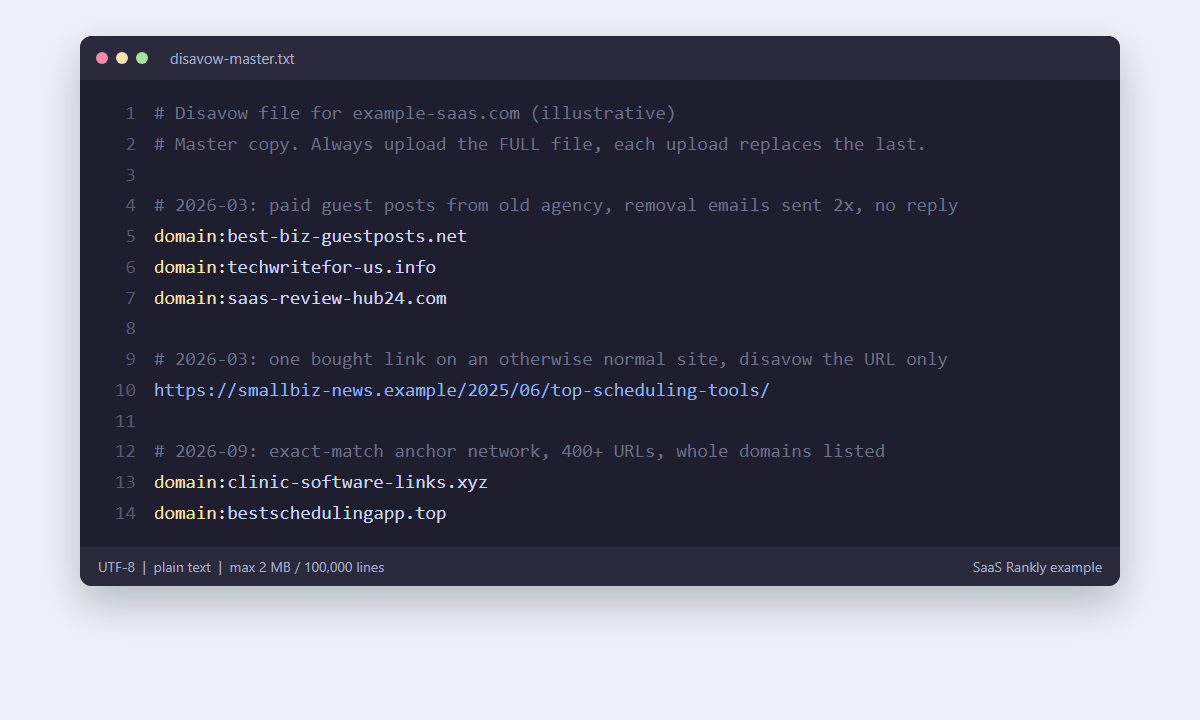
A few rules that save a second upload:
- Prefer
domain:over single URLs for spam sites. Link networks create new URLs faster than you can list them. - Do not add
www.orhttps://to domain lines.domain:spam-site.netcovers every subdomain and protocol. - Keep comments short and dated. They are for you next year, not for Google.
- Every upload replaces the previous file. If you disavowed 60 domains in March and upload a file with 10 new ones in September, the 60 are no longer disavowed. Always edit the old file and re-upload the full list.
An illustrative disavow audit, from 1,240 domains to 22
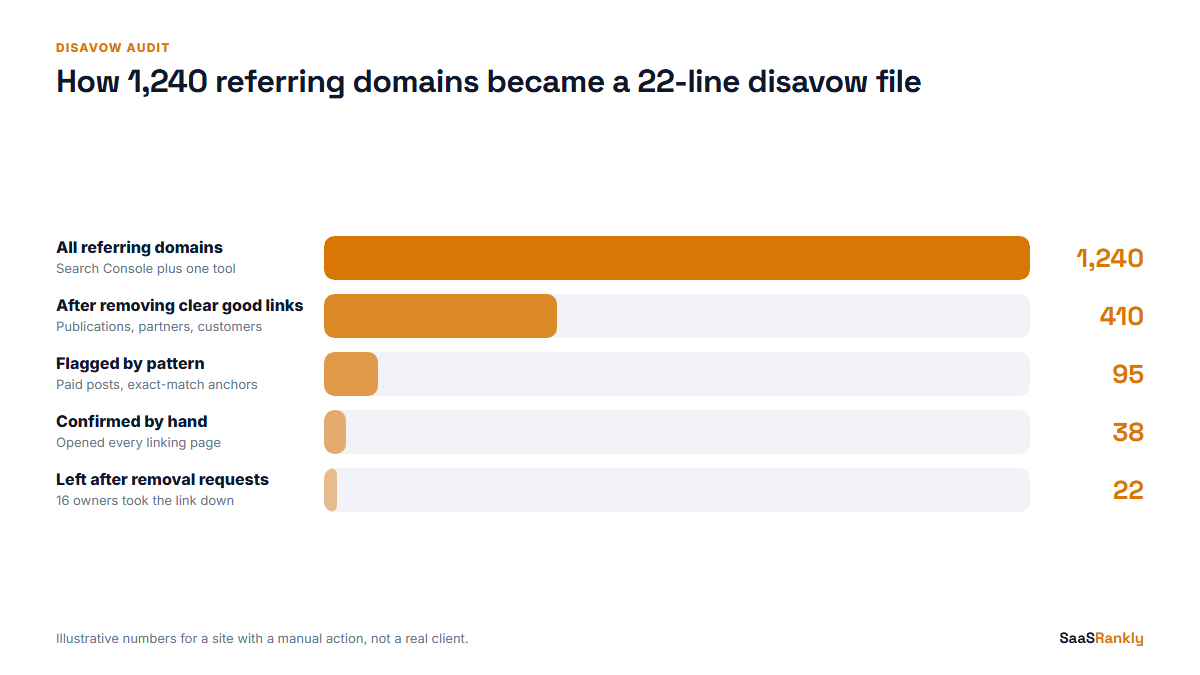
This is a made-up but realistic example. A SaaS company has a manual action after a former agency ran a paid guest post programme. Its backlink tool lists 1,240 referring domains. Here is how that list narrows.
- Export everything. Pull referring domains from Search Console’s Links report plus one third-party tool. Search Console is the list Google itself shows you, so start there.
- Remove the obvious good. Real publications, customers, partners, review sites, anything with traffic and topical fit. That cut 1,240 to 410 in this example.
- Flag patterns, not scores. Look for exact-match commercial anchors, “write for us” sites with no traffic, sites that sell posts openly, and pages with dozens of unrelated outbound links. 410 became 95.
- Check each flagged domain by hand. Open the linking page. Is the link editorial or bought? 95 became 38.
- Try removal first. Email the site owners for the 38. In this example 16 removed the link. Keep a log of every request, because a reconsideration reviewer wants to see effort.
- Disavow what is left. 22 domains went into the file.
Notice how few links end up disavowed. A file with 900 domains in it usually means someone trusted a toxicity score and threw out good links along with the bad. That can cost more rankings than the original problem. Tracking your link profile weekly, as in our backlink monitoring routine, makes this audit far smaller when it is needed.
How to upload a disavow file in Search Console
- Build and save the
.txtfile. Check the encoding in your editor. - Open Google’s Disavow Links tool while signed in to the account that owns the site.
- Choose the property. The tool has historically worked with URL-prefix properties, so if you only have a Domain property, add a URL-prefix one for your main host first.
- Click Upload disavow list and pick the file. The tool reports syntax errors straight away. Fix them and upload again.
- If you are responding to a manual action, submit a reconsideration request that explains what you removed, what you disavowed and how you stopped the practice.
Processing is not instant. Google applies the file as it recrawls the linking pages, which takes weeks and sometimes months for pages it rarely visits. Do not judge the result after a week.
Bing has its own disavow feature in Bing Webmaster Tools, and it does not read your Google file. If Bing traffic matters to you, and with Copilot using Bing’s index it may matter more than it used to, repeat the process there.
Disavow mistakes that do real damage
| Mistake | What happens | Fix |
|---|---|---|
| Disavowing everything a tool flags | Good links stop counting, rankings slip | Only disavow links you can explain as manipulative |
| Uploading a new short file over an old long one | Previously disavowed domains count again | Keep one master file and always upload the whole thing |
| Disavowing your own subdomains or CDN | Internal signals get confused | Never list your own hosts |
| Using URLs for a network of spam sites | New spam URLs keep appearing | Use domain: lines |
| Disavowing to “clean up” before a launch | No gain, some risk | Spend the time on earning better links instead |
Open-source scripts that auto-generate disavow files from tool exports exist, and some are well made. Use them to format the list, not to decide what goes in it.
If you are still unsure whether a particular link is worth keeping, run it through the seven checks in our website backlink guide. And if the links in question came from a network sold as “tier two” or “tier three”, our piece on tiered link building explains why those tend to be the ones worth disavowing. For the wider off-site picture, see off-page SEO for SaaS.
Quick recap: disavow
- Disavow tells Google to ignore specific links or whole domains when assessing your site.
- Use it for manual actions and for links you know were bought or part of a scheme.
- Do not disavow random spam or anything flagged only by a toxicity score.
- The file is UTF-8 plain text, one URL or
domain:line per row, 2 MB and 100,000 lines maximum. - Each upload replaces the last one, so keep a master file.
- Expect weeks, not days, before the disavow takes effect.
FAQ
What does disavow mean in SEO?
It means asking Google not to count certain backlinks when it evaluates your site. It is done by uploading a list to the Disavow Links tool in Search Console.
Is it safe to use the Google disavow tool?
It is safe when used on links that are clearly manipulative. Disavowing good links removes their value, so a careless file can lower rankings.
How long does a disavow take to work?
It applies as Google recrawls the linking pages. That is usually several weeks, and longer for pages Google rarely visits.
Should I disavow toxic backlinks?
Not just because a tool calls them toxic. Google already ignores most spammy links. Disavow when there is a manual action or a known paid or scheme link pattern.
What format does a disavow file need?
A .txt file in UTF-8 or 7-bit ASCII, one full URL or one domain:example.com entry per line, with optional # comments.
Can I undo a disavow?
Yes. Upload a new file without those entries, or cancel the list in the tool. The links start counting again as Google recrawls them, which also takes time.