If you have ever asked how to find SERP features opportunity on a SaaS site, the honest answer is that most of the data is already sitting in your Search Console account. You do not need a $400 a month suite to spot it. You need three exports, one spreadsheet column that most people skip, and about two hours. This guide walks through the exact process we run on client sites, with an illustrative worked example and the filters we use to throw out the “opportunities” that will never pay back.
One warning before we start. A SERP feature is only an opportunity if it sends clicks to a page you control. Plenty of features look tempting in a tool report and then turn out to be zero-click boxes that keep the searcher on Google. We will filter those out early, because chasing them is the most common way we see teams waste a quarter.
What counts as a SERP feature opportunity
We use a narrow definition. A SERP feature opportunity is a query where three things are true at once:
- A feature that can link to your site (featured snippet, video, sitelinks, AI Overview citation, image pack, review stars) appears for the query.
- You already rank on page one or the top of page two for it, so Google trusts the page enough to consider it.
- Someone else currently owns the feature, or nobody does because the format is not met.
If you rank 34th, the feature is not your problem yet. Ranking is. And if the feature is a knowledge panel for a competitor’s brand, there is nothing to win. This narrow view sounds strict, but it cuts a typical list of 300 “feature keywords” from a tool down to 20 or 30 that are worth a writer’s afternoon. For background on which features still send traffic at all, our guide to SERP features for SaaS covers the full list.
How to find SERP features opportunity: the five-step process
Here is the routine. Each step has one output, and the outputs stack into a single sheet.
Step 1: Export queries where you sit in positions 1 to 15
Open the Performance report in Search Console, set the date range to the last three months, and turn on clicks, impressions, CTR and position. Filter position to under 15 (you will need the export for this, since the UI filter is clumsy). Export to Sheets. On a mid-sized SaaS blog this usually gives 800 to 3,000 rows. If the 1,000-row UI cap gets in the way, the API or a Looker Studio connector gets you the rest; we explain the workarounds in getting keyword data out of Search Console.
Step 2: Pull the Search appearance rows
Switch to the Search appearance tab in the same report. This shows which rich result types your pages already earn: review snippets, videos, product snippets and a few others. It only lists features you already have, so it tells you what is working, not what is missing. Note which page types appear there and which never do. If your comparison pages earn review stars but your feature pages never show anything, that gap is already a lead.
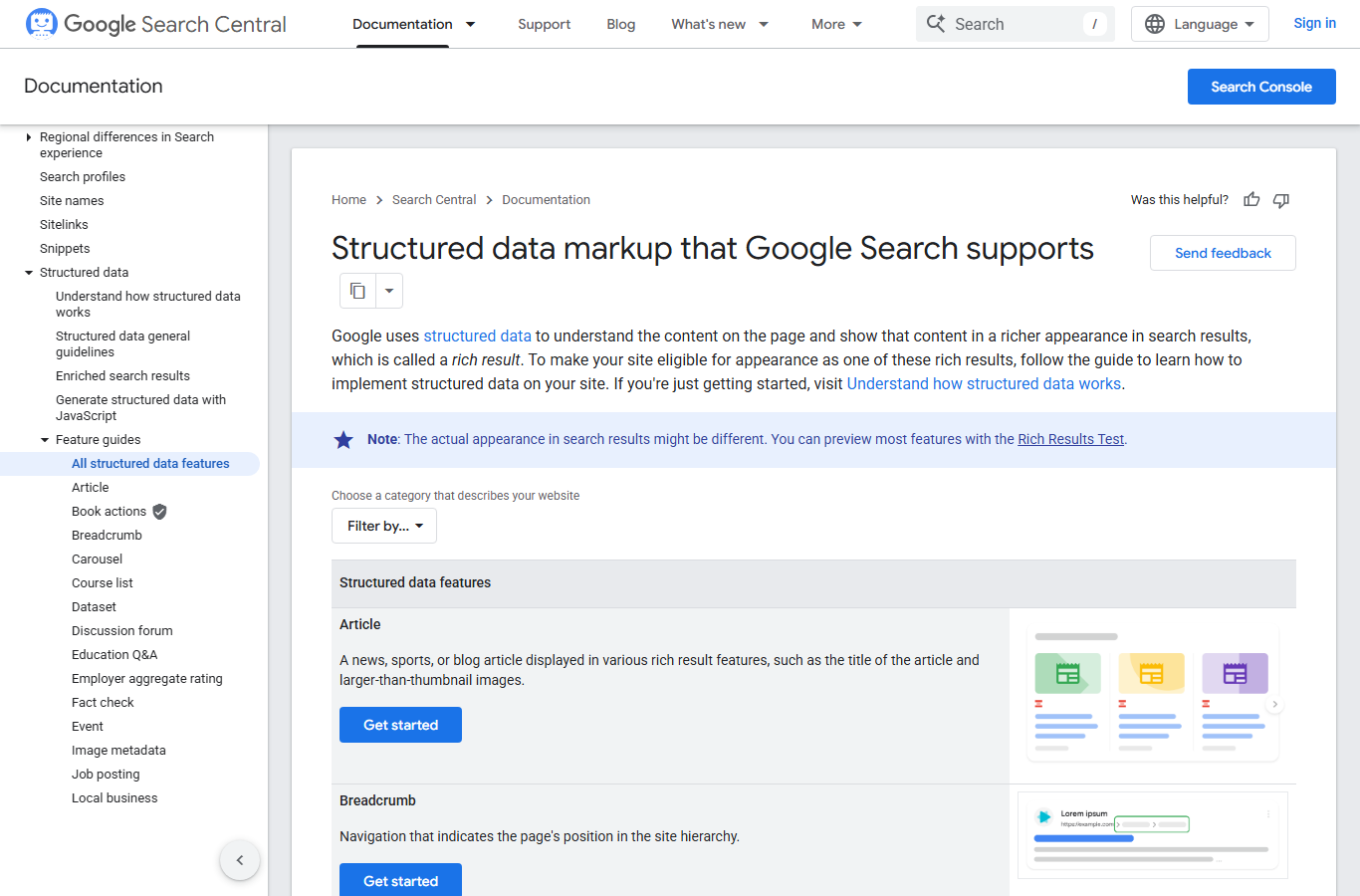
Google’s own search gallery is the reference for which features depend on structured data and which do not. It is worth keeping open in a tab during this step.
Step 3: Flag queries with a CTR gap
This is the column most people skip. Add an “expected CTR” column based on position, then a “CTR gap” column that subtracts actual CTR from expected. We use a rough curve: position 1 around 25 percent, position 2 around 13 percent, position 3 around 9 percent, positions 4 to 5 around 5 percent, positions 6 to 10 around 2 to 3 percent. These are our working numbers at the time of writing, not a law, and branded queries will blow past them.
A query where you rank 2 but earn 3 percent CTR is screaming that something sits above you and takes the click. Nine times out of ten that something is a SERP feature. This is the core trick in how to find SERP features opportunity without paying for a tracker: the CTR gap points you at the SERPs worth looking at by hand.
Step 4: Look at the actual results page
Take the top 30 queries by impressions with a CTR gap of 4 points or more. Open each in a private window with your main market set, and record what you see in four columns: which feature appears, who owns it, what format the owner used (a 45-word definition, a numbered list, a table, a video), and whether your page has a section that could match that format. Rank trackers can count features, but they are bad at showing you the format, and the format is the part you copy. If you prefer to automate the counting, our roundup of free SERP rank trackers shows which ones log features on the free plan. Once the list is built, our walkthrough on how to track SERP features week to week keeps it from going stale.
Step 5: Score and pick
Score each row on four things from 1 to 3: impressions, gap size, how close your current page is to the winning format, and business value of the query. Multiply impressions by the other three if you like a single number, or just add them. Then pick the top 10 and stop. Ten fixes shipped beat forty fixes planned.
A worked example (illustrative)
To make how to find SERP features opportunity concrete, the table below is a made-up but realistic slice of what step 5 produces for a project management SaaS. The numbers are illustrative, chosen to show the method rather than lifted from a client account.
| Query | Position | Impressions / mo | CTR | Feature above us | Owner’s format | Score |
|---|---|---|---|---|---|---|
| what is a gantt chart | 2.1 | 14,200 | 2.8% | Featured snippet | 42-word definition | 11 |
| sprint planning template | 3.4 | 6,900 | 3.1% | Image pack + video | Downloadable sheet, 4 min video | 9 |
| kanban vs scrum | 4.0 | 5,300 | 2.2% | AI Overview (3 citations) | Comparison table | 10 |
| project tracker free | 6.2 | 3,100 | 1.4% | Sitelinks for a rival | Brand navigational | 3 |
| how to write a project brief | 2.8 | 2,400 | 4.0% | People also ask | Question H2s | 6 |
The first row is the obvious pick. Position 2 with 14,200 impressions and a 2.8 percent CTR means roughly 400 clicks a month when the curve says we should see 1,800 or so. The owner of the snippet uses a 42-word definition directly under an H2 that repeats the question. Our page buries the definition in the third paragraph. That is a 20-minute edit.
Row four is the trap. It looks like an opportunity in a tool export, but the sitelinks belong to a competitor’s brand result. No edit wins that. It gets a 3 and drops off the list.
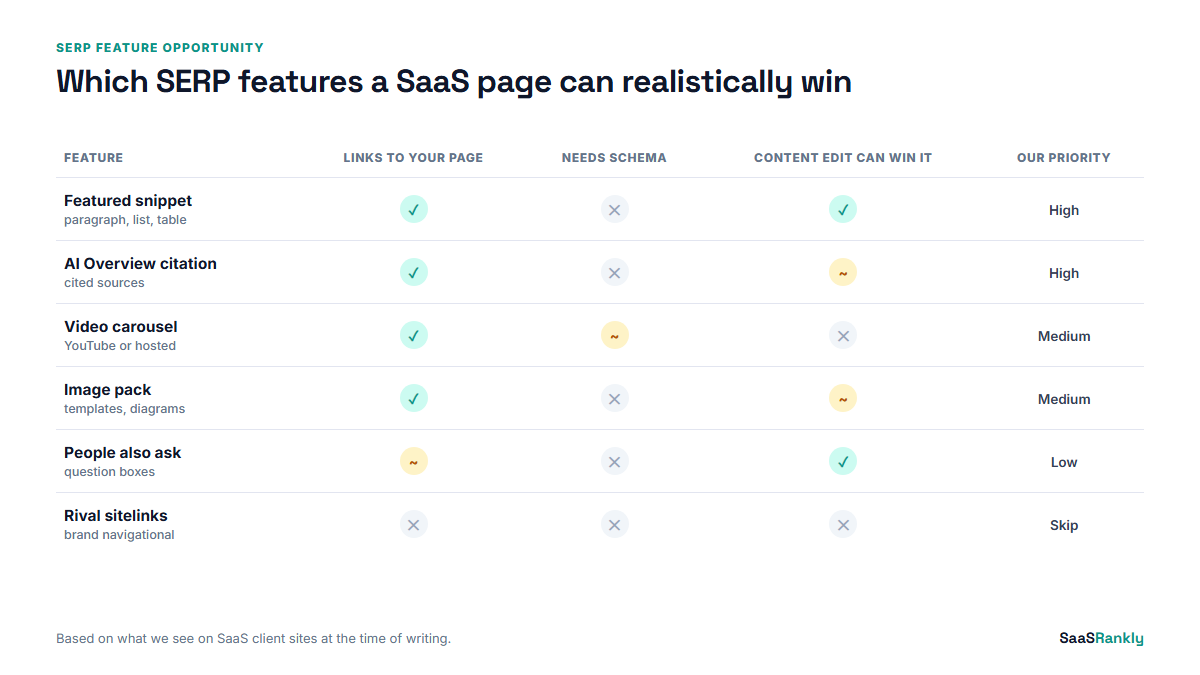
How to find SERP features opportunity, then match the format
Once you know how to find SERP features opportunity rows, the fix depends on which feature it is. This is the short version of what we change for each one.
Featured snippet. Put a direct answer of 40 to 55 words right under an H2 or H3 that matches the query wording. For list snippets, use a real HTML ordered list with 5 to 8 items, each starting with a verb. For table snippets, use an HTML table, not an image of one. Preview how your title and description will look next to the snippet with our SERP snippet preview tool.
AI Overview citation. In our experience these favour pages that state a clear claim with a number in the first two sentences of a section, and pages with a comparison table. There is no markup that requests a citation. Write sections that stand on their own when lifted out of the page.
Video. If a video carousel appears and you have no video, you will not win it with text. A two to four minute screen recording on YouTube, embedded on the page with a VideoObject block, is usually enough for a SaaS how-to query. Validate the markup with our schema validator before you ship.
Image pack. Descriptive file names, real alt text, and an image that actually shows the thing (a template screenshot, not a stock photo). Templates and diagrams win image packs on SaaS queries far more often than illustrations.
People also ask. These send few clicks now that many answers sit inside AI Overviews, which we wrote about in PAA answers moving into AI Overviews. We still add question H3s, but we do not prioritise PAA over the other four.
Myths about how to find SERP features opportunity
| Myth | What we actually see |
|---|---|
| You need position 1 to win a snippet. | Most snippets we win come from positions 2 to 5. Format beats rank once you are on page one. |
| FAQ schema will get you more SERP space. | FAQ rich results were restricted to a small set of sites in 2023. The markup does no harm, but it will not create a feature for a SaaS blog. |
| Every feature is worth owning. | Knowledge panels for rivals, local packs and shopping units are not winnable for a typical SaaS page. Filter them out in step 4. |
| A tool report is the opportunity list. | It is a starting list. The CTR gap and a manual look at the page are what turn it into one. |
Measuring whether it worked
The last part of how to find SERP features opportunity is proof. Give each change four weeks. Then compare the same query’s CTR and clicks against the four weeks before the edit, with position held roughly steady. If position moved too, the comparison gets muddy, so note it. We log every change in a simple sheet with the date, the query, the feature targeted and the before and after numbers. After a quarter that sheet tells you which kinds of edits work on your site, which is worth more than any general guide, including this one.
A realistic hit rate, in our experience, is around one feature won for every three attempts. On the illustrative gantt chart row above, winning the snippet would roughly triple clicks on that query. Two or three wins like that per quarter usually beat a month of new content for traffic, and they cost a fraction of the time. If you want to put those clicks in context against other ranking signals, our post on SERP metrics that matter explains how we report them.
Quick recap: how to find SERP features opportunity
- Export Search Console queries in positions 1 to 15 for the last three months.
- Check Search appearance to see which features your page types already earn.
- Add expected CTR and a CTR gap column; gaps of 4 points or more are your shortlist.
- Look at each shortlisted results page by hand and record the owner’s format.
- Score on impressions, gap, format fit and business value, then pick ten.
- Match the format, wait four weeks, and log the before and after numbers.
FAQ
What is the fastest way to find SERP feature opportunities for free?
For how to find SERP features opportunity on a budget, use Search Console plus a spreadsheet. Export queries in positions 1 to 15, add an expected CTR column, and sort by the gap between expected and actual CTR. The biggest gaps almost always have a feature above you.
Do I need a paid rank tracker for this?
No, but it helps at scale. Under about 200 priority queries, a manual monthly check is fine. Above that, a tracker that logs which features load per keyword saves hours.
Which SERP feature is easiest to win for a SaaS blog?
The paragraph featured snippet, by a distance. It needs a 40 to 55 word answer under a heading that mirrors the query, on a page that already ranks on page one.
Can schema markup create a SERP feature?
Only for features that depend on structured data, such as review snippets, video and product details. It does not create featured snippets or AI Overview citations, which come from the page text.
How long does it take to win a featured snippet after editing?
We usually see a change within one to four weeks, once Google recrawls the page. Requesting indexing in Search Console after the edit can shorten that.
How often should I repeat this process?
Run the full how to find SERP features opportunity process quarterly, and check your top 20 commercial queries monthly. SERP layouts change often enough that a list from six months ago is mostly stale.