Canonical tags are the quietest way to lose traffic on a SaaS site. Nothing looks broken, the pages load, the sitemap is fine, and yet half your feature pages never show up in Search Console because a template is pointing them all at the homepage. This post covers what canonical tags do, how strongly Google weighs them against other signals, and the templating bugs we keep finding on SaaS sites, with the fix for each.
If you only take one thing away: a canonical tag is a hint, not an instruction, and it is one of several signals. Google can and does ignore it when the rest of the page disagrees.
What canonical tags do
When several URLs show the same or nearly the same content, search engines pick one to index and serve. That chosen URL is the canonical. A canonical tag, <link rel="canonical" href="..."> in the head of the page, tells them which one you would prefer.
Typical cases on a SaaS site where the same content lives on more than one URL:
- Tracking parameters:
/pricing/?utm_source=linkedinand/pricing/ - Filters and sorting on a template or directory page
- Trailing slash and non-slash versions
- http and https, or www and non-www, if redirects are incomplete
- A blog post republished on a partner site or a syndication network
- Print or AMP variants, and paginated series done badly
How strongly do canonical tags count?
Google publishes the order of influence for canonicalisation signals, and it is worth knowing because it explains most of the surprises.
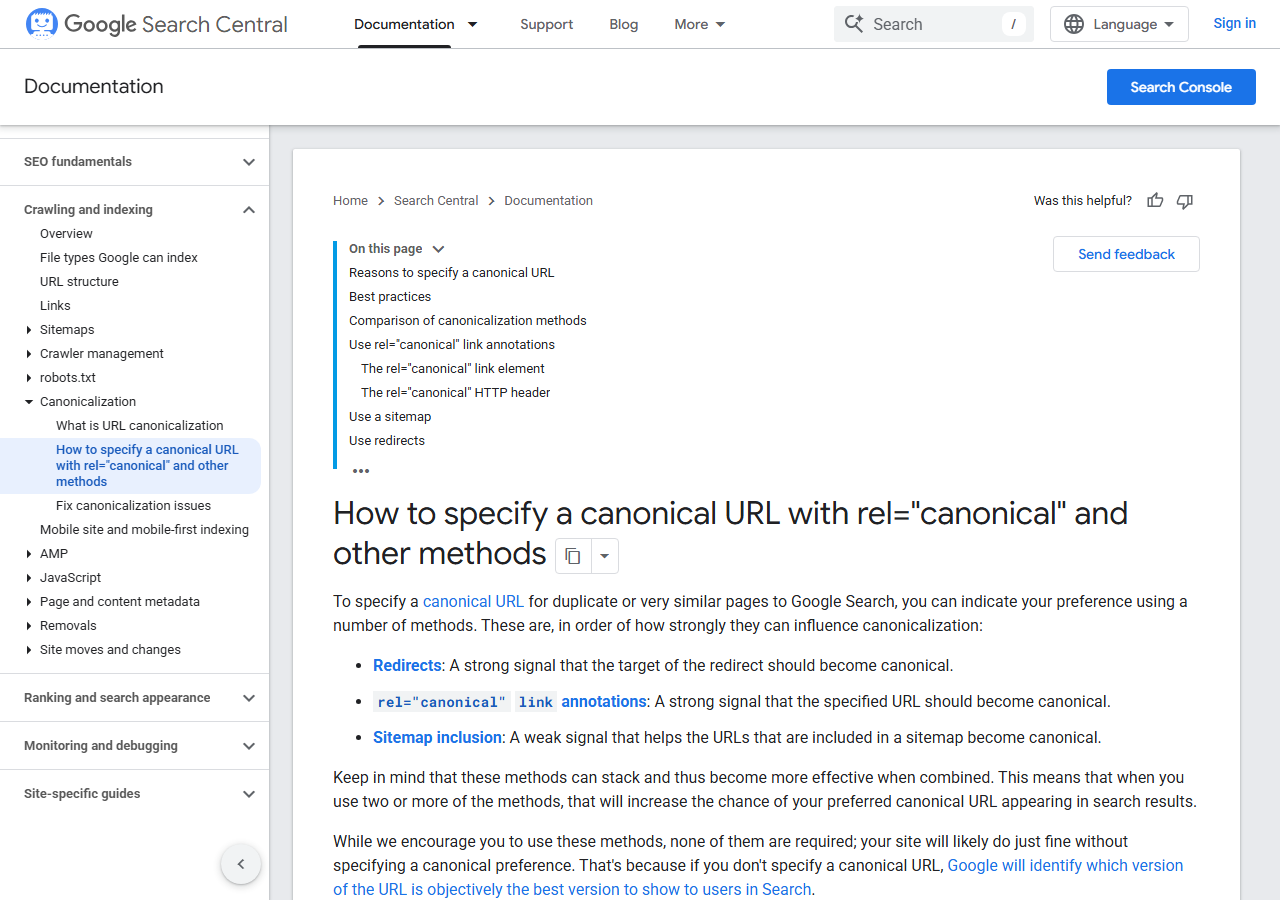
Redirects are the strongest signal. The canonical link element is strong. Listing a URL in a sitemap is a weak signal. Nothing here is binding, which is why Search Console shows “Google-selected canonical” and “User-declared canonical” as two separate lines. When they differ, Google decided your hint was wrong.
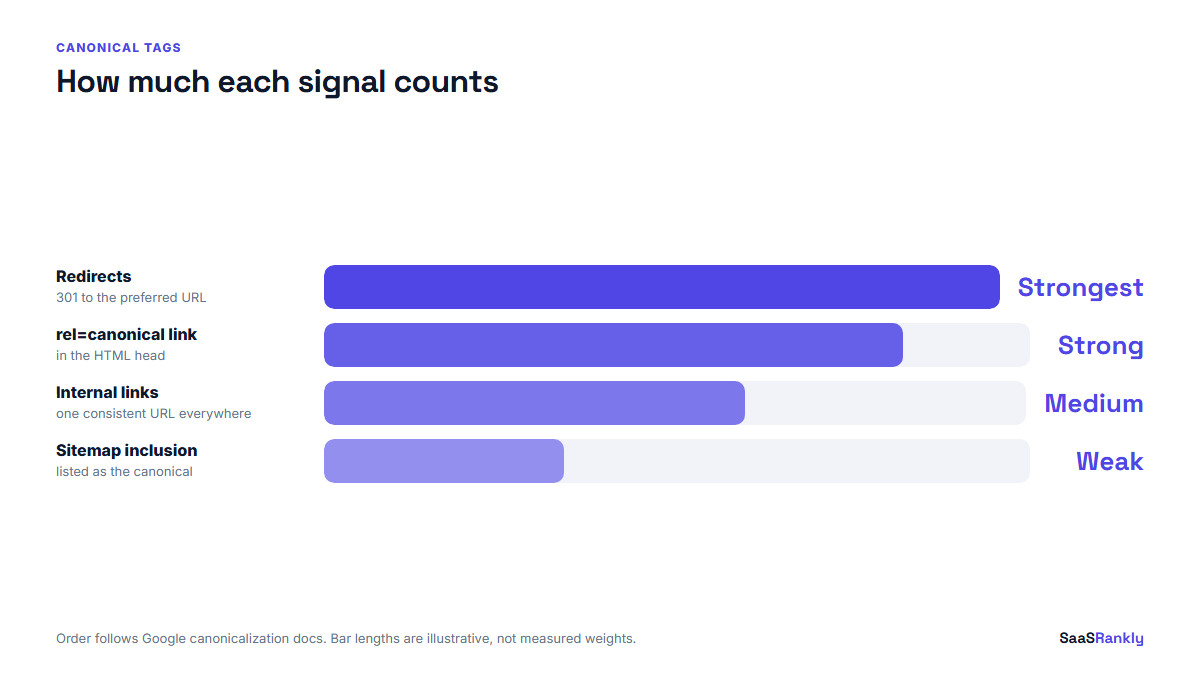
The practical consequence: stacking signals works. A page that redirects correctly, self-canonicalises, appears in the sitemap and is linked internally with one consistent URL will almost always win. A page whose canonical tag says one thing while every internal link says another is asking for trouble.
The canonical tag bugs we keep finding on SaaS sites
| Bug | What you see in Search Console | Fix |
|---|---|---|
| Every page canonicals to the homepage | “Alternative page with proper canonical tag” across the whole site | Make the canonical dynamic, defaulting to the page’s own URL |
| Canonical points to a staging domain | Pages drop out of the index after a deploy | Set the base URL per environment, never hardcode it |
| Canonical includes tracking parameters | Duplicate URLs indexed with UTM strings attached | Strip query parameters when building the canonical |
| Paginated pages canonical to page one | Deep items never get indexed | Self-canonical each page in the series |
| Canonical injected by JavaScript only | Inconsistent indexing, slow to update | Render it server side in the HTML head |
| Two canonical tags on one page | Google ignores both | Audit the theme and the SEO plugin, one of them is duplicating it |
| Canonical to a redirecting URL | “Redirect error” or the wrong URL indexed | Point canonicals at final 200 URLs only |
| Trailing slash mismatch | Both versions in the index, split signals | Pick one form and use it in links, sitemap and canonical |
The homepage one is the most expensive and the easiest to miss, because the homepage keeps ranking and nobody notices the other 60 pages quietly leaving the index. Our guide to fixing SaaS indexing problems covers how to spot it in the Pages report.
How to audit canonical tags in an afternoon
- Crawl the site and export every URL with its canonical. Anything where the canonical does not match the URL needs a reason.
- Sort by canonical target. If one URL is the canonical for 40 pages, you have found a template bug.
- Check the sitemap. Every URL in it should be self-canonical and return 200. Our sitemap checker flags canonical mismatches and redirects in one pass.
- Spot check in Search Console. Inspect five important URLs and compare user-declared and Google-selected canonicals.
- Check internal links. If your nav links to
/pricingand the canonical says/pricing/, fix the links, not just the tag.
Redirect hygiene is part of the same job. A sitemap full of 3xx responses undermines the canonical signals you just fixed, which we wrote up in 3xx in sitemap.
Canonical tags and syndicated content
If you republish your posts on Medium, dev.to, LinkedIn or a partner blog, ask for a cross-domain canonical back to your original. Most platforms support it. Where they do not, at least ask for a plain link to the original in the first paragraph.
This matters more than it used to. A syndicated copy on a stronger domain can outrank your original, and then the AI answer engines cite the copy instead of you. Our notes on getting cited by ChatGPT cover why the canonical version of a page is the one that tends to get named.
When not to use a canonical tag
- Pages that are genuinely different. Two feature pages with 30% shared boilerplate are not duplicates. Canonicalising one to the other deletes it from search.
- Across languages. Use hreflang for language variants and let each one self-canonicalise.
- Instead of a redirect. If a URL has moved for good, redirect it. A canonical leaves both URLs live and hopes Google agrees with you.
- To hide thin pages. If a page should not be indexed, use noindex. Canonicals are for choosing between duplicates, not for tidying.
That last one comes up a lot in audits. Canonical tags and noindex do different jobs, and mixing them on the same page sends a contradictory signal that Google resolves however it likes. The rest of the checks sit in our technical SEO for SaaS guide.
Checking canonical tags after a redesign
Redesigns break canonicals more often than any other event, because templates get rebuilt and the base URL moves. Run this the day after launch, not a month later.
- View source on five pages, one per template, and read the canonical by hand.
- Confirm the staging domain appears nowhere in the HTML.
- Compare the sitemap URL count against the pre-launch figure.
- Inspect the homepage, one feature page and one blog post in Search Console.
- Watch the Pages report for a week. A rise in “Alternative page with proper canonical tag” is the early warning.
For a wider post-launch checklist, see how to check indexed pages.
Quick recap: canonical tags
- Canonical tags tell search engines which URL you prefer when several show the same content.
- They are a strong hint, not a rule, and redirects outrank them as a signal.
- The most costly SaaS bug is a template that canonicals every page to the homepage.
- Canonical targets must be final 200 URLs, not redirects or staging domains.
- Do not use canonical tags in place of noindex, hreflang or a redirect.
- Re-audit canonical tags the day after any redesign or migration.
FAQ
What are canonical tags used for?
They tell search engines which version of duplicate or near-duplicate content you want indexed, so ranking signals consolidate on one URL instead of splitting across several.
Does every page need a canonical tag?
Not strictly, but a self-referencing canonical on every page is the safest default. It costs nothing and it protects you when someone adds tracking parameters to your URLs.
Can Google ignore my canonical tag?
Yes. It is one signal among several. If internal links, the sitemap and redirects point elsewhere, Google may pick a different canonical and will say so in the URL Inspection tool.
What is the difference between a canonical tag and a 301 redirect?
A redirect sends users and crawlers to another URL and removes the old one from circulation. A canonical leaves both URLs reachable and expresses a preference for indexing.
Should paginated pages canonical to page one?
No. Each page in a series should point at itself, otherwise items that only appear on later pages may never get indexed.
How do I check the canonical tag on a page?
View the page source and look for the link element with rel=”canonical” in the head, or run the URL through Search Console’s URL Inspection, which shows both your declared canonical and Google’s chosen one.