Most people learn how to check indexed pages by typing a site: query into Google, reading the number, and treating it as fact. That number is an estimate, it swings by thousands on large sites, and we have seen it report 1,900 pages for a site with 340 URLs. If you are making decisions off it, you are making them off noise.
Here is the accurate way to check indexed pages, in the order we run the checks on a client site, plus the one bulk method that actually scales past a few hundred URLs.
Three myths about how to check indexed pages
Myth: the site: operator gives you a count. It gives you an estimate generated for a search results page, not a figure pulled from the index. Google’s own search advocates have said repeatedly not to use it for auditing. It is useful for spotting whether a specific URL exists, and for nothing else.
Myth: in the sitemap means indexed. A sitemap is a suggestion. On the last four SaaS audits we ran, the gap between submitted and indexed sat between 8 and 41 percent. A sitemap full of URLs that redirect makes that gap worse, which we covered in 3xx in sitemap.
Myth: Search Console’s Pages report is real-time. It lags. Two to seven days is normal, and after a big migration we have seen it lag two weeks. If you published something yesterday and it is not in the report, that is expected, not a problem.
Six ways to check indexed pages, ranked by accuracy
| # | Method | Accuracy | Scales to | Use it for |
|---|---|---|---|---|
| 1 | Search Console URL Inspection | Exact | 1 URL at a time | Settling an argument about one page |
| 2 | Search Console Pages report | High, lags a few days | Whole property | The real number and the reasons |
| 3 | URL Inspection API | Exact | 2,000 URLs/day | Bulk auditing, the only true bulk method |
| 4 | GSC Performance report, page filter | Proxy, conservative | Whole property | Pages that index and get impressions |
| 5 | site: operator on one URL | Good for yes/no | 1 URL | A fast sanity check with no login |
| 6 | site: operator for a count | Poor | Nothing | Nothing. Stop using it. |
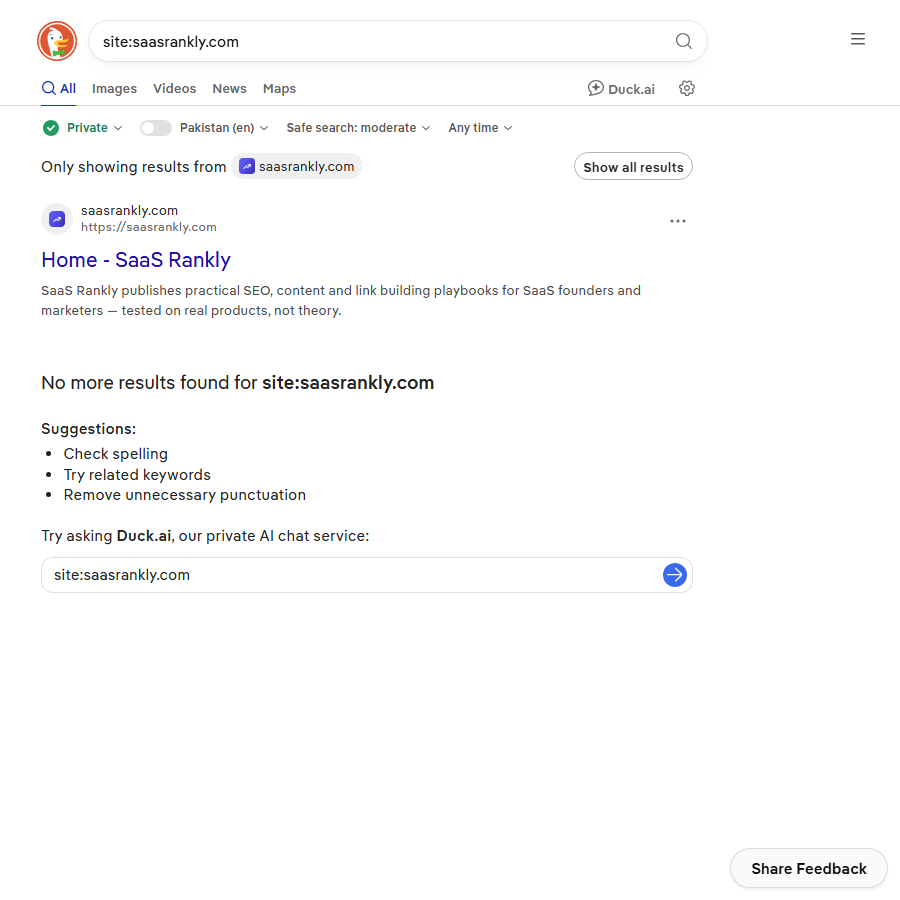
That screenshot is the argument in one image. A site: search for our own domain returned a single result, while Search Console reports dozens of indexed URLs for the same site. Different engines, different indexes, and an operator that was never built for counting.
Anyone learning how to check indexed pages properly should start at row 2 and treat row 6 as a curiosity. Method 4 deserves a note because it is the one people miss. Open the Performance report, set the date range to 28 days, switch to the Pages tab, and count the rows. Any page with at least one impression is definitely indexed. Any page with zero impressions might be indexed and might not. That gives you a hard floor in about 15 seconds, no API needed.
How to check indexed pages in bulk
Once a site passes roughly 200 URLs, the manual route stops working. There are two options that hold up.
The URL Inspection API
Google gives you 2,000 inspections per property per day, 600 per minute. You feed it URLs, it returns coverage state, last crawl date, canonical, and whether the page is on Google. This is the only bulk method that returns ground truth. It is also the quickest way to audit a site on a hosted platform where you cannot read server logs, a constraint we work around in the Webflow SEO walkthrough.
You do not need to write code for it. Screaming Frog connects to the API directly: crawl the site, connect the Search Console account, and it stamps each URL with its indexing status in a column. Sitebulb and a few Sheets add-ons do the same. Budget one hour for the OAuth setup the first time.
Crawl versus sitemap versus GSC, joined in a sheet
The cheaper approach. Export three lists and compare them:
- Every indexable URL from a full crawl.
- Every URL in your XML sitemaps.
- Every URL with an impression in the last 28 days from GSC.
A URL in list 1 and 2 but missing from list 3 is your suspect pile. It will contain some pages that are indexed but attract no impressions, so it overstates the problem, but it costs nothing and it points you at the right 40 URLs to inspect properly. If your sitemaps are a mess to begin with, fix that first using sitemap examples as a reference.
Worked example: 214 published, 96 indexed
Made-up numbers, real pattern. A project management SaaS ran programmatic comparison pages and could not work out why organic was flat.
| Check | Count | What it told us |
|---|---|---|
| URLs in sitemap | 214 | Baseline |
| site: estimate | ~1,100 | Garbage. Ignored. |
| GSC Pages, indexed | 96 | The real number |
| Crawled, currently not indexed | 81 | Google saw them and passed |
| Discovered, currently not indexed | 29 | Crawl budget or quality signal |
| Duplicate, Google chose different canonical | 8 | Near-identical comparison pages |
The 81 in “Crawled, currently not indexed” was the story. Those pages were programmatic X vs Y pages where 70 percent of the body text was identical across the set. Google crawled them, decided they added nothing, and moved on. Rewriting 30 of them with genuinely different comparison data got 24 indexed within five weeks. The other 51 were deleted, which is usually the right call. Our guide to SaaS comparison pages covers what “genuinely different” needs to mean.
Notice that the site: estimate would have told this team everything was fine. That is the practical cost of the myth.
Why pages are not indexed, in the order we check
Knowing how to check indexed pages is half the job. Knowing what to do when the number is wrong is the other half. When the count comes back low, work down this list. It is ordered by how often the cause turns out to be the real one, based on the audits we run.
- Noindex tag left on. Staging config shipped to production. Checks in 30 seconds, causes maybe a fifth of the cases we see.
- Blocked in robots.txt. Google cannot crawl it, so it usually cannot index it. See blocked by robots.txt for the full pattern.
- Canonical pointing elsewhere. Often a templating bug where every page in a section canonicals to the section index.
- Thin or duplicate content. The “Crawled, currently not indexed” bucket. This is a quality verdict, not a bug, and no amount of resubmitting fixes it.
- No internal links. Orphan pages sitting in the sitemap with nothing pointing at them. Google treats them as low priority.
- Soft 404. The page returns 200 but looks empty, usually a JavaScript route that renders nothing without data.
- Genuinely too new. Under two weeks old on a low-authority domain. Wait.
We wrote up the fixes for the messier cases in fix SaaS indexing problems. The order above matters more than the list itself, because the first three are free to check and the last four are expensive.
The 10-minute weekly check: how to check indexed pages on a schedule
Once you have the baseline, keep it honest with a short routine. Open the GSC Pages report, note the indexed number and compare it to last week. If it dropped by more than 3 percent, open the “Why pages are not indexed” table and look at which reason grew. Then spot-check two new URLs with URL Inspection. That is the whole check, and it catches most breakage before it costs you a month. If the site is brand new and nothing shows up yet, start with how to get your website to show up on Google.
Quick recap: how to check indexed pages
- The site: count is an estimate. Use it for one URL, never for a total.
- Search Console’s Pages report is the real number, with a few days of lag.
- URL Inspection is exact but one URL at a time; the API does 2,000 a day.
- Counting pages with impressions in the Performance report gives you a fast, conservative floor.
- A sitemap-to-crawl-to-GSC join in a spreadsheet finds the gap for free.
- Check noindex, robots.txt, and canonicals before you blame content quality.
FAQ
How do I check if a single page is indexed?
Paste the full URL into the search bar at the top of Search Console and read the URL Inspection result. It tells you outright whether the page is on Google, when it was last crawled, and which canonical Google picked. Without a Search Console login, search for the exact URL in quotes or use site: plus the URL path.
Why does site: show more pages than Search Console?
Because they measure different things. The site: figure is a rough estimate produced for a results page and it often includes URL variants, parameters, and pages Google has since dropped. The Search Console number is drawn from the property’s actual index state. Trust Search Console.
How long does it take Google to index a new page?
Hours to a few weeks. On an established site with good internal linking we typically see one to four days. On a new domain, three to six weeks is normal and there is no trick that reliably shortens it. Requesting indexing in Search Console helps a little for a handful of URLs, not for a batch of 200.
Can I force Google to index my pages?
No. You can request it, and you can make indexing more likely with internal links, a clean sitemap, and content that is not a near-duplicate of something already ranking. The Indexing API only officially supports job posting and livestream pages, so do not build a workflow on it for a blog.
What does “Crawled, currently not indexed” actually mean?
Google fetched the page, evaluated it, and decided not to include it. It is almost always a quality or duplication judgement rather than a technical fault. Resubmitting does nothing. Changing the page does.
Is there a free tool to check indexed pages in bulk?
If you want to learn how to check indexed pages in bulk for free, Screaming Frog’s free tier crawls 500 URLs and connects to the URL Inspection API, which covers most early-stage SaaS sites at no cost. Beyond that, the API itself is free, you just need something to call it. Google’s indexing documentation is worth a read before you build anything on it.