Most teams that want to track SERP features assume they need a paid rank tracker with a “features” column. You do not, at least not for the first year. A spreadsheet, Search Console, a weekly 20-minute check and a few free tools will tell you which features show up for your money keywords, which ones you hold, and which ones you just lost. That is the whole job.
This guide is the setup we use on small SaaS sites: what to record, how often, which free sources cover which features, and the point where paying for a tool finally makes sense. If you have not yet worked out which features are worth chasing at all, start with our post on finding SERP feature opportunities and come back here once you have a shortlist.
Why you should track SERP features at all
Position alone stopped describing a search result years ago. A page can sit at position 3 and get fewer clicks than it did at position 5, because an AI Overview, a “People also ask” box and a video carousel moved in above it. If you only watch average position, you will see a stable line while traffic slides, and nobody on the team will know why.
When you track SERP features, you get the missing column. You can say “we are still third, but the result now opens with an AI Overview and four PAA questions” and the traffic drop stops being a mystery. We see this conversation happen in almost every monthly review on SaaS accounts that pay attention to it, and in none of the ones that do not.
There is also an upside case. Features are where small sites win. A three-person SaaS will not outrank G2 for a category term, but it can own the featured snippet for a narrow “how to” query or appear in the PAA box under a comparison search. You only notice those wins if you are recording them.
What to record when you track SERP features
Keep the sheet small. Every extra column is a column nobody fills in by week six. These are the eight we use:
| Column | What goes in it | Why it earns its place |
|---|---|---|
| Date | Week of the check | Lets you line changes up with Search Console data |
| Keyword | The exact query, US English | One row per keyword per week |
| Our position | Organic rank, blue links only | The baseline everyone already watches |
| Features present | Short codes: AIO, FS, PAA, VID, IMG, LOC, SHOP, DISC | Shows how crowded the page is above you |
| Features we hold | Same codes, only the ones citing our domain | The win column |
| Holder of the snippet | Domain that owns the featured snippet | Tells you who to study |
| Cited in AI Overview | Yes, no, or not shown | The fastest moving column in 2026 |
| Note | One line, only when something changed | Context for next month’s review |
Two rules make the sheet usable. Use codes, not sentences, so you can filter. And log a row every week even when nothing changed, because “no change for eight weeks” is itself a finding.
How to track SERP features for free: the weekly routine
This is the routine, in the order we run it. It takes about 20 minutes for 25 keywords once you have done it twice.
- Pick 20 to 30 keywords, not 300. Choose the terms that drive trials or demos, plus five you are trying to break into. Tracking every keyword is how the routine dies.
- Check each SERP in a clean session. Use a private window, signed out, with the location set to your main market. Personalisation shifts features more than it shifts blue links, so a signed-in check will mislead you.
- Write the feature codes in order from the top. “AIO, PAA, FS” is different from “FS, PAA, AIO”. The order tells you how far down the fold your blue link really sits.
- Open Search Console for the same keywords. Compare clicks and impressions with the previous week. A new feature plus falling CTR at a stable position is the pattern you are looking for.
- Check the search appearance filter. In the Performance report, the Search appearance dimension shows rich result types Google attributes to your pages, such as review snippets or FAQ results where they still show.
- Note one action per change. Lost a snippet? Write who took it and what their answer looks like. Gained a PAA spot? Write which page and which heading Google pulled.
Step 4 is the one people skip and it is the one that makes the sheet worth keeping. Feature tracking without click data is trivia.
Free sources, ranked by what they cover
No single free source covers every feature. Here is how we split the work, with prices and limits as they stand at the time of writing.
| Source | Cost | Covers | Blind spot |
|---|---|---|---|
| Manual check in a private window | $0 | Every feature, as a real user sees it | Slow, one location at a time |
| Google Search Console | $0 | Clicks, CTR, some rich result types via search appearance | Does not list features you do not hold |
| Free tier of a rank tracker | $0, usually 10 to 50 keywords | Position plus a feature flag column on some tools | Weekly or slower refresh, few locations |
| Rich Results Test and a schema validator | $0 | Whether your page is eligible for a rich result | Eligible does not mean shown |
| Paid tracker with SERP history | Roughly $30 to $130 a month | Daily feature history across hundreds of keywords | Cost, and AI Overview capture varies by tool |
Our opinion: the manual check plus Search Console beats a free rank tracker for the first 25 keywords, because you see the layout instead of a flag. We compared the free trackers in our free SERP rank tracker review if you want automation for the position side. For eligibility, run your structured data through our schema validator before you blame Google for not showing a rich result.
A worked example: eight weeks of tracking
Here is an illustrative log from a fictional invoicing SaaS we will call Billwise. The numbers are invented but they follow the pattern we see on real accounts. The keyword is “invoice approval workflow”, a term with roughly 300 searches a month.
| Week | Position | Features present | Held by Billwise | Clicks (GSC) | CTR |
|---|---|---|---|---|---|
| 1 | 4 | PAA, VID | none | 22 | 5.1% |
| 2 | 4 | PAA, VID | none | 21 | 4.9% |
| 3 | 3 | AIO, PAA, VID | none | 14 | 3.2% |
| 4 | 3 | AIO, PAA, VID | none | 13 | 3.0% |
| 5 | 3 | AIO, FS, PAA | PAA (1 question) | 17 | 3.9% |
| 6 | 3 | AIO, FS, PAA | PAA, AIO citation | 24 | 5.4% |
| 7 | 2 | AIO, FS, PAA | FS, PAA, AIO citation | 38 | 8.6% |
| 8 | 2 | AIO, FS, PAA | FS, PAA, AIO citation | 36 | 8.3% |
Without the features column, weeks 3 and 4 look like a mystery: the page moved up a spot and lost a third of its clicks. With it, the story is obvious. An AI Overview arrived. The team responded in week 4 by adding a 45-word definition under a question-style H2 and a short numbered list of approval steps. By week 7 they held the snippet and a citation in the Overview, and clicks were up 64 percent on week 1 at almost the same position.
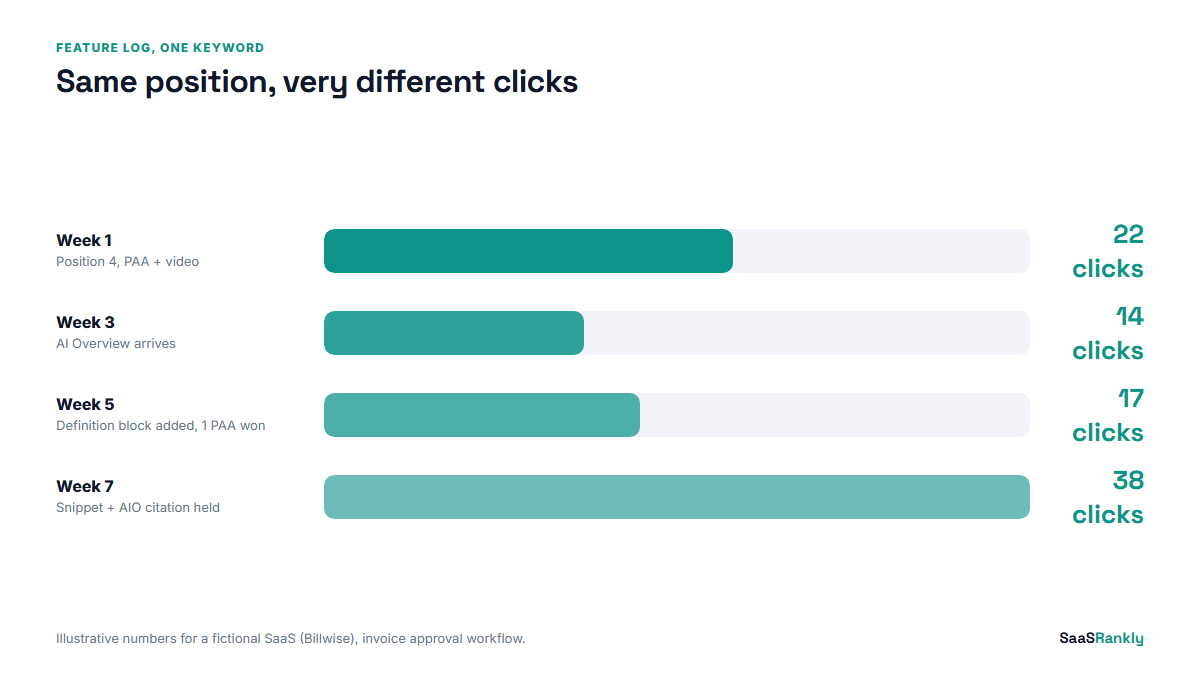
That is the case for the routine in one table. You cannot react to a feature you never wrote down.
Which features move clicks, and which you can ignore
Not every feature deserves a column. Here is our short take on each, for SaaS queries specifically.
- AI Overviews. The biggest click mover on informational terms right now. Track presence and whether you are cited. We see CTR drops of 20 to 40 percent on terms where one appears and you are not in it.
- Featured snippets. Still worth winning on “how to” and “what is” terms. Shorter, cleaner answers win more often than longer ones.
- People also ask. Low click value per question, but a strong signal of what the searcher wants next. Mine it for H2s.
- Video carousels. Matter for tutorial queries. If a carousel shows up on your money term, a two-minute screen recording may beat another 500 words.
- Sitelinks. Only on brand terms. Track them once a quarter, not weekly.
- Shopping and local packs. Rare on B2B SaaS queries. If one appears, the intent probably is not yours.
To check how your title and description will look once you are in the result, our SERP snippet preview tool helps before you change anything live.
When to stop doing it by hand
The manual routine breaks at around 50 keywords or three markets. Past that point, the 20 minutes becomes two hours and the sheet stops getting filled. That is when a paid tool pays for itself.
Before you buy, check three things in the trial. Does it store feature history, not just today’s snapshot? Does it record AI Overview presence and citations, or only classic features? Can you export the feature column to the same sheet format you already use? A tool that fails the first test is a rank tracker with decoration. Our SERP metrics post covers which of the numbers those tools report deserve a place in your report.
Quick recap: track SERP features
- Track SERP features on 20 to 30 money keywords, not your whole list.
- Use eight columns, short feature codes, and log a row every week.
- Check in a signed-out private window set to your main market.
- Always pair the feature log with Search Console clicks and CTR.
- Prioritise AI Overviews and featured snippets; check sitelinks quarterly.
- Move to a paid tracker past about 50 keywords, and test its feature history first.
FAQ
Can I track SERP features in Google Search Console?
Partly. The Search appearance filter in the Performance report shows rich result types your pages earned, but Search Console does not list features you do not hold, and it does not tell you when an AI Overview sits above you. Pair it with a manual check.
How often should I track SERP features?
Weekly for your 20 to 30 most important keywords is enough for most SaaS sites. Daily checks mostly record noise. After a core update or a big content change, check twice that week.
Do free rank trackers show SERP features?
Some show a simple flag for features on the page, usually without history and without AI Overview citations. They are fine for positions. For features, a manual check gives you more detail at this scale.
What is the best way to track AI Overviews?
Record two things per keyword: whether an AI Overview appears and whether your domain is cited in it. Check in a signed-out session, because Overviews vary more with personalisation and location than blue links do.
How many keywords should I track for SERP features?
Start with 20 to 30: the terms that drive trials, plus five you are trying to break into. Add more only once the weekly routine has run for a month without being skipped.
Why did my clicks drop when my ranking stayed the same?
The most common reason is a new feature above you, usually an AI Overview, a featured snippet or a video carousel. Check your feature log for the week the drop started. If you do not have one, that is the reason to start one now.